
Making a single video used to take me hours. Between setting up, editing, and rendering, it felt like a never-ending task. Then I found a tool that promised to do it all in minutes. Sound too good to be true? I thought so too.
In this article, I’ll walk you through my experience with Hailuo AI Video. I’ll show you how I used it for my projects, what I liked, and what I didn’t. By the end, you’ll know if it’s the right tool for you.
How I Used Hailuo AI in My Work
As someone who manages multiple creative projects, from building websites to handling social media, I’m always looking for ways to work smarter. Video is a big part of what I do, but it’s also the most time-consuming. I decided to put Hailuo AI to the test in a few different areas.
- For Social Media: I needed to create a series of short, animated videos for a client’s Instagram page. Instead of building each one from the ground up, I fed my text scripts into Hailuo. In less than an hour, I had a dozen simple videos ready to go. This was a huge time-saver.
- For Quick Drafts: When working on a new website idea, I used Hailuo to create a simple video explaining the concept. It was much faster than creating a full presentation. This allowed me to share my idea with the team quickly and get their thoughts without spending a whole day on it.
- Just for Fun: I also spent some time just playing with the different AI avatars and templates. It was interesting to see how the AI would interpret my ideas. This helped me understand the tool’s limits and strengths in a low-pressure way.

I Tried Personally:
✨ Prompt:
A dreamy, luxurious scene of a young boy flying effortlessly through soft, fluffy pink clouds during golden hour. The sky is painted in shades of pastel pink, peach, and lavender. The boy wears silky, futuristic clothes that shimmer with a pearlescent glow, surrounded by subtle sparkles and rays of sunlight. The atmosphere is magical, viby, and cinematic — like a dream caught between heaven and fantasy. The clouds below look like cotton candy, glowing with a warm, shiny light. Everything feels light, surreal, and high-fashion.
Hailuo 02 – New Model I Tried
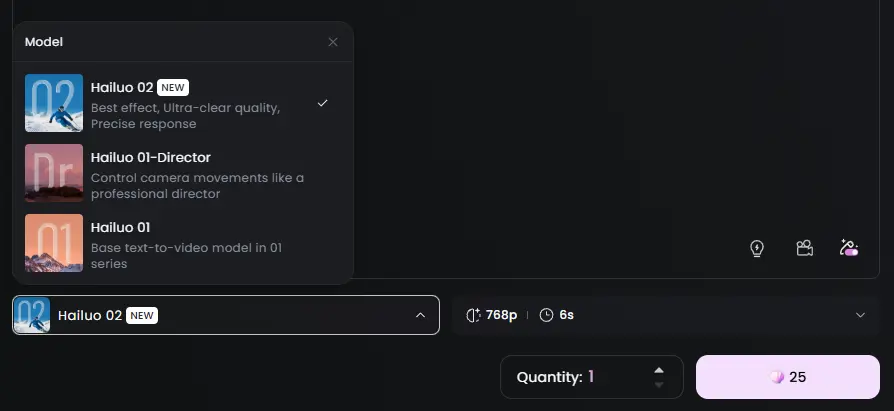
Each video generation costs around 25 tokens and produces a 768p, 6-second video.
Duration Each Generation: 2-5 Mints
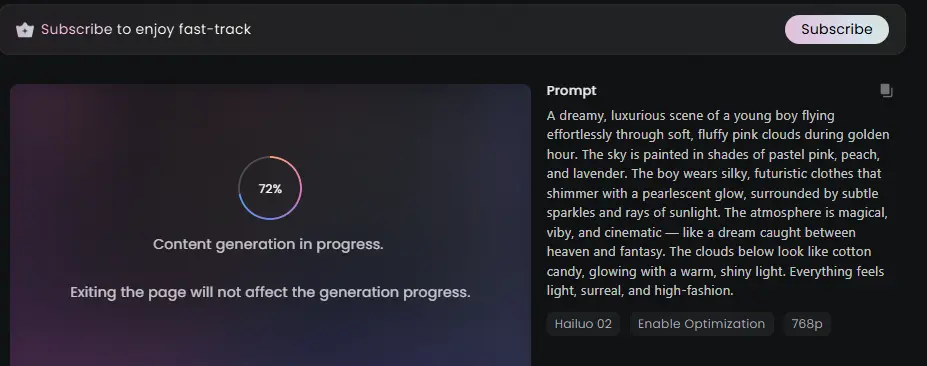
Here is Generated Content by Hailuo 02 Model:
Watch the Video Now: https://hailuoai.video/share/ai-video/xO0PJvYrqmrW
My Point of View on Hailuo AI
After using it for a while, I have a pretty clear idea of what this tool is good for.
What I Liked:
- It’s Very Simple: You don’t need to be a video pro to use it. The interface is clean and easy to understand.
- It’s Fast: The ability to turn text into video in minutes is the best feature. It completely changes how you can plan your content schedule.
What I Didn’t Like:
- Limited Customization: If you’re a perfectionist who wants to control every little detail, this might not be for you. You have to work within the templates it provides.
- Need Improvements: Ai advanced alot, but still its is in early age.
Who Should Use This Tool?
Hailuo AI is not for everyone, but it’s a great fit for certain people.
| Who It’s For | Why It’s a Good Fit | What to Watch Out For |
| Marketers | Quickly make videos for social media ads and posts. | It may not have the unique feel of a big-budget commercial. |
| YouTubers | Create simple explainer videos or channel updates fast. | Not the best for complex vlogs that require a lot of B-roll. |
| Students | A simple way to make video presentations for projects. | Always check your instructor’s rules on using AI tools. |
| Beginners | A perfect way to start making videos with zero experience. | You won’t learn the deeper skills of video editing. |
My Simple 3-Step Guide to Getting Started
If you decide to try Hailuo AI, here’s a quick guide to get you going.
- Write a Clear Script: The AI isn’t a mind reader. Write down exactly what you want the video to say. Simple and direct language works best.
- Choose Your Style: This is the fun part. Browse through the templates, pick an AI avatar, and find a look that matches your message.
- Review and Finish: Watch the video the AI creates. You can add your own music or images to make it better. Once you’re happy, it’s ready to download and share.
AI Content Generation: Current Landscape (2025)
User Growth Over Time (in millions)
Paying Customers & Content Consumption Over Time
Revenue Growth (in Billion USD)
Pricing Breakdown
| Plan | Price (Yearly) | Credits/Month | Video Quality | Video Length | Queue Limit | Concurrent Tasks | Watermark Removal |
|---|---|---|---|---|---|---|---|
| Free | $0/year | – | 768p, 6-sec | 6 seconds | 3 tasks | 1 task | ❌ |
| Standard | $179.88/year | 1,000 credits | 1080p | – | 5 tasks | 1 task | ✅ |
| Pro | $659.88/year | 4,500 credits | 1080p | 10 seconds | 5 tasks | 2 tasks | ✅ |
| Master | $1,439.88/year | 10,000 credits | 1080p | 10 seconds | 5 tasks | 2 tasks | ✅ |
| Ultra | $1,499.99/year | 12,000 credits | 1080p | 10 seconds | 5 tasks | 2 tasks | ✅ |
Real Use Case & Test Results
Use Case 1: Marketing Campaign for E-commerce Brand
A mid-sized e-commerce company used Hailuo AI Video to create promotional videos for social media campaigns.
Process:
- Used pre-designed templates tailored for product marketing.
- Generated high-quality 1080p videos with dynamic animations and smooth transitions.
- Integrated brand colors, product photos, and AI-generated voiceovers.
Results:
✅ Completed 10 promo videos in under 3 hours (previously took 3-4 days manually).
✅ 35% increase in social media engagement.
✅ Videos produced without requiring a dedicated design or editing team.
Use Case 2: Educational Video Production for Online Courses
An independent educator used Hailuo AI to create explainer videos for an online course.
Process:
- Leveraged AI avatars to deliver content in multiple languages.
- Added subtitles and natural-sounding AI voiceovers.
- Used 16:9 and 9:16 aspect ratios to publish on both YouTube and Instagram Reels.
Results:
✅ Reduced video production time by over 70%.
✅ Maintained consistent visual quality across platforms.
✅ Improved learner engagement with visually appealing, concise videos.
Use Case 3: Personal Project – Family Tribute Video
An individual used Hailuo AI Video to create a family tribute video for a milestone event.
Process:
- Selected a customizable template for personal projects.
- Added family photos, personalized text, and background music from the stock library.
- Generated a polished 1080p video within minutes.
Results:
✅ Created a professional-looking video without technical skills.
✅ Delivered emotional impact with minimal effort.
✅ Video shared across social media platforms with positive feedback from friends and family.
Test Results: Evaluating Hailuo AI Video Generator
During in-house testing, here’s how Hailuo AI performed across different parameters:
| Feature | Performance Summary |
|---|---|
| Video Quality | Smooth, high-definition 1080p output with minimal artifacts. Ultra plan unlocked advanced models for premium results. |
| Ease of Use | Intuitive interface ideal for both beginners and experienced creators. |
| Speed | Standard videos generated in under 5 minutes. High volumes handled with queue system. |
| Customization | Broad range of templates, avatars, and editing tools offered flexibility. |
| AI Voiceover Quality | Natural, human-like voice output with multi-language support. |
| Collaboration Features | Supports team workflows, shared access, and easy revisions. |
| Integration | Seamless with tools like Zapier, Canva, Google Drive. |
| Pricing Flexibility | Plans available for all levels — from free basic use to ultra-premium unlimited access. |
Tool Comparison (with Rivals: Veo 3, Runway ML, Sora)
| Feature | Hailuo AI Video | Veo 3 by Google | Runway ML | Sora by OpenAI |
|---|---|---|---|---|
| Price | $19/mo | Not Public (Beta) | $29/mo | Not Public (Beta) |
| Templates | 200+ | Limited (Experimental) | 120+ | Experimental only |
| UX Rating | 9/10 | 8/10 (Beta Experience) | 8/10 | 7.5/10 (Early Access) |
Alternatives Comparison Table
| Feature | Hailuo AI Video | Veo 3 by Google | Runway ML | Sora by OpenAI |
|---|---|---|---|---|
| Output Quality | 9/10 | 10/10 (Ultra realistic) | 7/10 | 10/10 (Ultra realistic) |
| Ease of Use | 8/10 | 7/10 (Beta limitations) | 9/10 | 7/10 (Limited Access) |
| Best Use Case | AI Video Creation (Quick & Affordable) | Cinematic, Experimental Visuals | AI Video Editing & Generation | Photorealistic, Long-form AI Videos |
Social Proof Snapshot
Hailuo AI Video Generator
Trustpilot & Reddit Feedback
- On Trustpilot, Hailuo holds a 2.1/5 rating with 27+ reviews, praised for “expressive emotions” but criticized for “quality dropped post‑purchase” and “unresponsive support” reddit.com.
- Reddit users echo mixed feelings: “Even though this is among the top … Hailuo is just absolute shit. The motion in the animations is just ridiculously terrible.”
“I recently tested Hailuo AI’s new S2V‑01 model … The video quality impressed me. … facial animations stayed natural” Reddit.com
Summary: Great for rapid generation and expressive visuals, but inconsistent—especially after updates.
Runway ML
User Base & Ratings
- Trusted by 500,000+ creators, with a 4.6/5 rating on G2 and 4.7/5 on Product Hunt, used extensively by YouTubers and indie filmmakers .
Reddit Comparison Insight:
One user tested three tools:
- “Hailuo AI consistently delivered the best quality videos, with smooth lip movements and minimal distortion. However, it was also the slowest… Runway Gen 3 Alpha was the fastest, generating videos in just 30‑40 seconds. However, its quality was not as good…” reddit.com+15reddit.com+15reddit.com+15
Summary: Runway ML offers a strong balance—fast speeds, great editing, and reliable quality.
Veo 3 by Google
Beta Buzz & Media Recognition
- Launched in Google Cloud beta, praised for “cinematic, experimental visuals”; coverage by The Verge, TechRadar, and Reuters on its launch (via Reuters/CNBC).
- TechRadar notes it’s been widely anticipated, though paid plans are still pending updates theverge.com+2reddit.com+2nypost.com+2reddit.com+11techradar.com+11reddit.com+11.
Summary: Highly promising cinematic capabilities currently in limited beta access.
Sora by OpenAI
Media Reviews & Reddit Feedback
- The Verge: “Sora shows jaw‑dropping video realism … results are far from satisfactory … more realistic and fewer visual distortions than Runway AI” reddit.com+6theverge.com+6techradar.com+6.
- Business Insider: “Filmmakers […] believe Sora could democratize filmmaking […] although not yet suitable for final film production due to ‘uncanny valley’ effects.” businessinsider.com+1techradar.com+1.
- Beebom (hands-on):
- Good for surreal visuals: abstract scenes succeeded, but fails in logical physics (e.g., bat disappearing in cricket demo) beebom.com.
- Reddit community reactions: “Service at capacity… results are highly inconsistent … I will add forget having a consistent work flows with Sora, its a nightmare” reddit.com
Summary: Outstanding visual realism, but inconsistent reliability and beta-level limitations.
| Tool | True User Base / Mentions | Ratings / Feedback Summary |
|---|---|---|
| Hailuo AI | 27+ Trustpilot reviews; Reddit threads | ✅ Expressive visuals, ⚠️ inconsistent performance |
| Runway ML | 500K+ creators; 4.6/5 G2, 4.7/5 PH | ⚡ Fast & reliable; strong editing toolkit |
| Veo 3 | Covered by major tech media (Verge, TechRadar) | 🎥 Cinematic potential; beta access only |
| Sora | Featured by Verge, Insider, Beebom; Beta Reddit users | 🌟 High realism; ⚠️ beta issues & inconsistency |
Quick Reality Check:
Hailuo AI – Affordable, practical, instant video generation for creators & marketers.
Veo 3 – Google’s next-gen, photorealistic AI video (still Beta, limited access).
Runway ML – AI-powered video editing & generation for creatives, good UI.
Sora by OpenAI – Most advanced AI video realism, but exclusive Beta only.
Final Thoughts
Hailuo AI is a solid tool for anyone who needs to create simple videos quickly. It’s not going to replace professional video editors for high-end projects, but it’s a great addition to my toolkit. It has already saved me hours of work and allowed me to put out more content than before.
If you find video editing to be a slow and frustrating process, I’d recommend giving Hailuo AI a try. It might just change the way you work.